Our Short List of 3
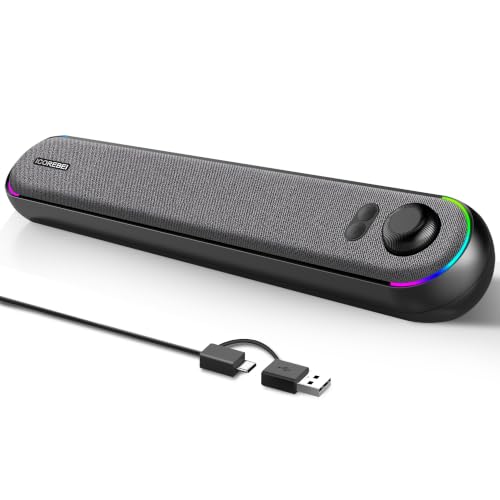
- Best for: Home-office desks where one soundbar covers wired and wireless use.
- Form: USB-powered soundbar for home office and desktop
- Inputs: USB-C, Bluetooth 5.3
- Sound: Hi-Fi stereo sound
- Lighting: 3 RGB modes
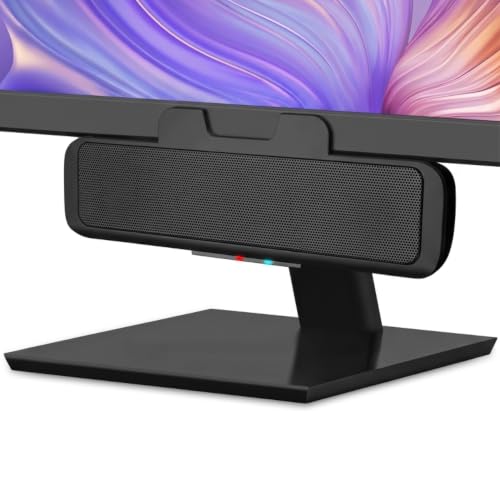
- Best for: Buyers who take calls and play music at the same desk.
- Form: USB and Bluetooth speaker bar with speakerphone
- Stated use: Compact speaker bar for PC and Mac
- Calls: Speakerphone, mic mute button
- Switching: Auto-switch between devices

- Best for: Buyers who want simple wired sound with no pairing or charging.
- Form: Small external wired speakers
- Input: 3.5mm audio plug
- Power: USB powered
- Sound: Stereo sound
All 5 Picks at a Glance
| Product | Specs | Action |
|---|---|---|
| ICOREBEI USB SoundBar |
| Check price on Amazon |
| Cyber Acoustics CA-2890BT |
| Check price on Amazon |
| 1Mii 3.5mm Speakers |
| Check price on Amazon |
 Cyber Acoustics CA-2890 |
| Check price on Amazon |
 SteelSeries Arena 9 |
| Check price on Amazon |
Key takeaways
- Compare five external speakers with stated Mac or macOS wording for MacBook Air desks at home, covering soundbars, USB bars, and a 5.1 gaming set.
A MacBook Air has capable built-in speakers for casual listening, but an external speaker adds volume, bass, and stereo separation that a thin laptop chassis cannot match. The catch is compatibility wording: many desktop speakers state only Windows or generic laptop use, and a listing that never mentions Mac leaves the buyer guessing. Every speaker in this guide states Mac or macOS wording in its own listing title, so the Mac element comes from the listing itself rather than from a roundup description.
All five picks were corroborated from listing cards in other sites’ speaker roundups, since this site carries no roundup of its own. No listing states the literal words “MacBook Air”, and this guide claims none does: the picks rest on stated Mac or macOS compatibility wording, which covers MacBook Air use through the Mac platform. Read the connection type, the stated platform wording, and the form factor before ordering, since USB, Bluetooth, and 3.5mm models differ in setup even when they look similar on a desk.
Quick Picks
As an Amazon Associate we earn from qualifying purchases.
| Product | Best for | Key spec from title |
|---|---|---|
| ICOREBEI USB SoundBar | Home-office desks | USB-C, Bluetooth 5.3, 3 RGB modes |
| Cyber Acoustics CA-2890BT | Calls and music | USB and Bluetooth, speakerphone |
| 1Mii 3.5mm Speakers | Simple wired setups | 3.5mm plug, volume control |
| Cyber Acoustics CA-2890 | Clip-on monitor bars | 10W, clip-on monitor mount |
| SteelSeries Arena 9 | Gaming desks | 5.1 surround, wireless rears |
How to Choose
Check the Mac wording in the listing itself
A speaker belongs in this guide only when its listing states Mac or macOS wording itself. Words such as “for Mac”, “for PC and Mac”, or “Compatible with Windows, macOS, ChromeOS, Linux” in the listing title confirm the platform, while a speaker described only for Windows, PC, or generic laptops does not qualify even if a review says it works with a Mac. No listing here states the literal words “MacBook Air”, and buyers should not assume that phrase appears on the product page. Confirm the exact platform wording in the listing title before ordering, since one model line can sell near-identical variants with different stated compatibility.
Match the connection to your desk setup
Connection type decides how the speaker fits a MacBook Air desk. USB-powered models draw power and audio over one cable, which keeps the desk tidy but ties up a port. Bluetooth models connect wirelessly and suit buyers who move the laptop between rooms, though they need charging or a separate power source. Models with a 3.5mm plug use the headphone jack and work without drivers, but the cable stays visible. Check whether the listing states USB-C, USB-A, Bluetooth, or 3.5mm input, and match that against the ports and adapters already on the desk.
Weigh form factor against available space
External speakers for a laptop desk come as soundbars, clip-on monitor bars, compact pairs, and full multi-speaker sets. A soundbar sits under the monitor and suits small desks, while a clip-on bar mounts to the monitor and frees desk space entirely. Compact pairs need room on both sides of the laptop, and a 5.1 set with rear speakers and a subwoofer needs the most space of all. Measure the desk width and depth before ordering, and check whether the listing states a clip-on mount, a soundbar form, or a multi-piece layout.
Compare extras without letting them decide
Extras such as RGB lighting, speakerphone microphones, playback buttons, and volume dials add convenience but never replace the core requirements of stated Mac wording, a matching connection, and a fitting form factor. A speakerphone suits buyers who take calls at the desk, while RGB lighting is purely cosmetic and adds nothing to sound. Treat each extra as a bonus: confirm the speaker first on platform wording and connection, then let the extras break ties between models that already qualify on the essentials.
The 5 Best Options
ICOREBEI USB SoundBar
- Best for: Home-office desks where one soundbar covers wired and wireless use.
- Form: USB-powered soundbar for home office and desktop
- Inputs: USB-C, Bluetooth 5.3
- Sound: Hi-Fi stereo sound
- Lighting: 3 RGB modes
Home-office desks where one soundbar covers wired and wireless use.
The listing states no wattage or driver size, so buyers who need output figures should check the product page details before ordering.
The ICOREBEI soundbar is the home-office pick, pairing USB-powered operation with USB-C input, Bluetooth 5.3, Hi-Fi stereo sound, and three RGB modes in a desktop soundbar form. Its listing states use for Mac, laptop, and monitor setups, which makes it the most explicit Mac-worded pick in this guide. The soundbar shape sits neatly under a monitor or beside a laptop stand, and the combination of wired USB-C and wireless Bluetooth covers both docked and portable desk arrangements without extra adapters.
Watch out for: The listing states no wattage or driver size, so buyers who need output figures should check the product page details before ordering.
Cyber Acoustics CA-2890BT
- Best for: Buyers who take calls and play music at the same desk.
- Form: USB and Bluetooth speaker bar with speakerphone
- Stated use: Compact speaker bar for PC and Mac
- Calls: Speakerphone, mic mute button
- Switching: Auto-switch between devices
Buyers who take calls and play music at the same desk.
The CA-2890BT is a different model from the USB-only CA-2890 in this guide, so confirm the BT model name in the listing before ordering.
The Cyber Acoustics CA-2890BT is the calls-and-music pick, combining USB and Bluetooth input with a built-in speakerphone in a compact bar. Its listing states the bar is for PC and Mac, and adds auto-switching between devices, a microphone mute button, and a five-foot cable. The speakerphone suits video calls at the desk, while auto-switching lets the bar move between a laptop and a phone without replugging. It is the pick for buyers who split desk time between meetings and music.
Watch out for: The CA-2890BT is a different model from the USB-only CA-2890 in this guide, so confirm the BT model name in the listing before ordering.
1Mii 3.5mm Speakers
- Best for: Buyers who want simple wired sound with no pairing or charging.
- Form: Small external wired speakers
- Input: 3.5mm audio plug
- Power: USB powered
- Sound: Stereo sound
Buyers who want simple wired sound with no pairing or charging.
No Bluetooth is stated in the listing, so buyers who need wireless connection should choose a Bluetooth model in this guide instead.
The 1Mii speakers are the simple wired pick, using a 3.5mm audio plug with a volume control in a small external-speaker form. The listing states stereo sound with a 3.5mm plug for Windows, Mac, and Linux PCs and monitors, and describes the pair as USB-powered PC speakers for desktop, laptop, and tablet use. There is no Bluetooth and no battery to manage, which suits buyers who want plug-in sound with nothing to pair or charge. The volume control sits on the speaker itself for quick adjustment.
Watch out for: No Bluetooth is stated in the listing, so buyers who need wireless connection should choose a Bluetooth model in this guide instead.
Cyber Acoustics CA-2890
- Best for: Tight desks where a monitor-mounted bar frees surface space.
- Form: USB speaker bar, clip-on monitor mount design
- Power: 10W
- Stated use: Compact speaker bar for PC and Mac
- Controls: Play and pause buttons, LED status light
Tight desks where a monitor-mounted bar frees surface space.
The CA-2890 is the USB-only model, distinct from the Bluetooth CA-2890BT in this guide, so confirm the exact model name in the listing before ordering.
The Cyber Acoustics CA-2890 is the clip-on pick, a 10W USB speaker bar with a clip-on monitor mount design. Its listing states a compact speaker bar for PC and Mac, with play and pause buttons, an LED status light, and plug-and-play operation. The clip-on mount attaches to the monitor and keeps the desk surface clear, which suits tight laptop desks where a freestanding soundbar would crowd the workspace. Play and pause buttons on the bar itself allow quick control without reaching for the laptop.
Watch out for: The CA-2890 is the USB-only model, distinct from the Bluetooth CA-2890BT in this guide, so confirm the exact model name in the listing before ordering.
SteelSeries Arena 9
- Best for: Gaming desks with room for rear speakers and a subwoofer.
- Form: 5.1 desktop gaming speakers
- Sound: 5.1 USB surround sound, subwoofer
- Rears: Wireless rear speakers, two-way speaker design
- Lighting: RGB light
Gaming desks with room for rear speakers and a subwoofer.
A 5.1 set needs the most desk and floor space in this guide, so measure for rear-speaker placement and the subwoofer before ordering.
The SteelSeries Arena 9 is the gaming pick, a 5.1 desktop speaker set with USB surround sound, wireless rear speakers, a two-way speaker design, a subwoofer, RGB light, and Bluetooth. Its listing states use with PC, PlayStation, mobile, and Mac, which makes it the only multi-speaker set in this guide with stated Mac wording. The wireless rear speakers remove one cable run, but the set still needs placement room for rears and a subwoofer. It suits buyers who want surround sound for games and films at a permanent desk.
Watch out for: A 5.1 set needs the most desk and floor space in this guide, so measure for rear-speaker placement and the subwoofer before ordering.
Which One Fits Your Situation
You work from home and take video calls
Choose the Cyber Acoustics CA-2890BT. Its speakerphone, mic mute button, and auto-switching between devices suit back-to-back calls, and the stated PC and Mac wording covers a MacBook Air desk directly. The compact bar form keeps the setup tidy, and Bluetooth covers a phone alongside the laptop without replugging cables between meetings.
You want the simplest possible setup
Choose the 1Mii 3.5mm speakers or the Cyber Acoustics CA-2890. The 1Mii pair needs only a 3.5mm plug and USB power, with a volume control on the speaker. The CA-2890 clips to the monitor and runs plug-and-play over USB. Both avoid pairing, charging, and wireless setup entirely, which suits buyers who want sound working the moment the cable is connected.
Your desk is small and crowded
Choose the Cyber Acoustics CA-2890 clip-on bar or the ICOREBEI soundbar. The clip-on mount lifts the speaker off the desk surface, while the soundbar slides under the monitor. Both keep the laptop, notebook, and coffee mug where they belong, and both state Mac wording in their listings so compatibility is confirmed rather than assumed.
You game and watch films at your desk
Choose the SteelSeries Arena 9. Its 5.1 surround sound, wireless rear speakers, subwoofer, and RGB lighting suit immersive play and film nights, and its listing states Mac use alongside PC, PlayStation, and mobile. Accept the extra space the rears and subwoofer need in exchange for surround sound that no single soundbar in this guide matches.
Common Mistakes
- Buying a speaker whose listing never states Mac wording, then assuming it works with a MacBook Air because a review says so.
- Confusing the Cyber Acoustics CA-2890 with the CA-2890BT, since the two models share a name but differ on Bluetooth and speakerphone features.
- Treating generic “for laptop” wording as MacBook Air wording, when the listing states no Mac or macOS compatibility at all.
- Ignoring the connection type and ordering a USB-A-only speaker for a desk that has only USB-C ports and no adapter.
- Choosing a 5.1 set for a small desk, then finding no room for rear speakers or a subwoofer.
Frequently Asked Questions
Do any of these listings state “MacBook Air” wording?
No. None of the five listings states the literal words “MacBook Air” in its title. Each pick rests on stated Mac or macOS compatibility wording in the listing itself, which covers MacBook Air use through the Mac platform. Buyers who need the exact phrase on the product page should check the listing before ordering, since this guide claims no wording the listings do not state.
Will a USB speaker work with a MacBook Air that has only USB-C ports?
It depends on the stated input. Models with USB-C input connect directly, while USB-A models need an adapter or hub. Check whether the listing states USB-C, USB-A, Bluetooth, or 3.5mm input, and match that against the ports on the desk. Bluetooth and 3.5mm models avoid the port question entirely, since neither uses a USB port for audio.
Is Bluetooth or wired better for desk speakers?
Wired USB and 3.5mm connections need no pairing and never run out of charge, which suits a fixed desk. Bluetooth suits buyers who move the laptop or connect a phone as a second source, and the Bluetooth models here also carry USB input as a fallback. Choose wired for simplicity at one desk, and Bluetooth when the speaker must serve more than one device or room.
Can a speakerphone bar replace a separate microphone?
For casual calls, yes. The CA-2890BT includes a speakerphone with a mic mute button, which suits everyday video meetings at the desk. Dedicated microphones still suit recording, streaming, or noisy rooms where pickup quality matters more. Match the choice to the call load: light meeting use suits the built-in speakerphone, while heavy recording use deserves a separate microphone.